วันพุธที่ 5 มิถุนายน พ.ศ. 2562

Powershell Scripts: Get DNS Record


Powershell Scripts: Get DNS Record


Import-Module dnsshell

##FQDN##
$ServerName = "adhq01.contoso.co.th"

##Domain Name##
$ZoneName = "contoso.co.th"

##Date Time##
$ondate = get-date -Format "ddMMyy"

##Get Dns Record##
##Server Name: adhq01.contoso.co.th##
##Zone Name: contoso.co.th## 
##Record Type: A Record##
##Select: String 10.xxx.xxx.xxx##

$results = Get-DnsRecord -Server $ServerName -ZoneName $ZoneName  -RecordType A | out-string -stream | Select-String "10."


##Out Put to File##
$results >"D:\DNSRecord\DNSRecords$ondate.csv"

Powershell Scripts: Scan Patch


Powershell Scripts: Scan Patch


function Hotfixreport {
$computers = Get-Content D:\Ying\Powershell\MS17010\scanlist.csv 
$MS17010= 'KB4012598', #Windows XP, Vista, Server 2003, 2008
               'KB4018466', #Server 2008
               'KB4012212', 'KB4012215', 'KB4015549', 'KB4019264', #Windows 7, Server 2008 R2
               'KB4012214', 'KB4012217', 'KB4015551', 'KB4019216', #Server 2012
               'KB4012213', 'KB4012216', 'KB4015550', 'KB4019215', #Windows 8.1, Server 2012 R2
               'KB4012606', 'KB4015221', 'KB4016637', 'KB4019474', #Windows 10
               'KB4013198', 'KB4015219', 'KB4016636', 'KB4019473', 'KB4016871', #Windows 10 1511
               'KB4013429', 'KB4015217', 'KB4015438', 'KB4016635', 'KB4019472' #Windows 10 1607, Server 2016$ErrorActionPreference = 'Stop' 
ForEach ($computer in $computers) {

  try
    {
Get-HotFix -cn $computer  | out-string -stream | select-string -pattern $MS17010

    }

catch

    {
            $NOPATCH = "System NOPATCH:$computer"
            $NOPATCH | Write-Warning
            $NOPATCH >> "$env:USERPROFILE\Desktop\NOPATCH.txt"

    }
}

}
Hotfixreport > "$env:USERPROFILE\Desktop\Hotfixreport.txt"

Powershell Scripts: Scan Port


Powershell Scripts: Scan Port


function CheckPort
   {
            # Define every server IP you need to test:
            $servers = Get-Content D:\ying\Powershell\MS17010\scanlist.csv 
            # Define the port number you need to test (eg: 3389 for RDP):
            $portToCheck = '49154'
            $ErrorActionPreference = 'Stop' 
                foreach ($server in $servers)
                    {
                        If ( Test-Connection $server -Count 1 -Quiet)
                        {   
                        try
                            {     
                            $null = New-Object System.Net.Sockets.TCPClient -ArgumentList $server,$portToCheck
                            $props = @{
                            Server = $server
                            PortOpen = 'Yes'
                                      }
                            }                             
                        catch
                            {
                            $props = @{
                            Server = $server
                            PortOpen = 'No'
                                      }
                            }
                        }
    Else
        {       
            $props = @{
            Server = $server
            PortOpen = 'Server did not respond to ping'         
                      }
        }
    New-Object PsObject -Property $props
        }
   }
CheckPort > "$env:USERPROFILE\Desktop\CheckPort.csv"

วันศุกร์ที่ 31 พฤษภาคม พ.ศ. 2562

CTF Write Up: Stapler

CTF Write Up: Stapler

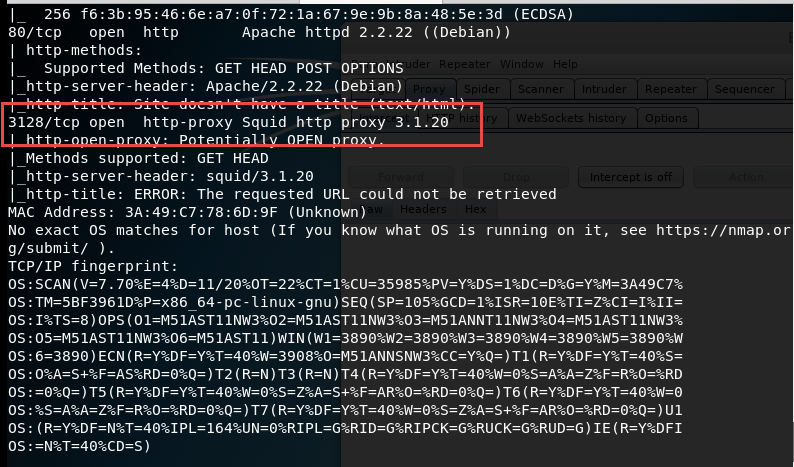
Result Scan


พบว่า 10.8.0.22 เปิด smb ไว้จึงทำการ scan ด้วย enum4linux


ทำการ brute force เพื่อหา username password สำหรับ ssh


Login u:SHayslett p: SHaysett


ทำการตรวจสอบ ว่า user ที่เราเข้ามาได้นั้นมีสิทธิ์ super user หรือไม่


หลังจากตรวจสอบว่าไม่พบจึงทำการค้นหา history file ต่างๆ


ทำให้ค้นพบ user and password: Peter


พบว่า user peter มีสิทธิ์ในเป็น super user


ทำการค้นหา flag file


Recommendation: วิธีการป้องกันหรือแก้ไขระบบ

1. Update Linux and Application to New Version
2. Change configuration File vsftpd.conf
     - Close anonymous user authentication.
     - Fix location path login ftp session user.
3. Clear History file (about: Authentication User)
4. Hide Application Version and Kernel Version.
5. Check permission users and don’t give high permission to users.
6. Close unnecessary service.


CTF Write Up: SkyTower

CTF Write Up: SkyTower

Enumeration Target
  Check Port & Service [Target]
- nmap -p- -A -Pn -v IPaddress


Check Web URL Path [Target]
- nikto -h IPaddress


  SQL Injection
- '^' / Check Response


วันอังคารที่ 28 พฤษภาคม พ.ศ. 2562

Reverse process backdoor [Backdoor.ExcaliburSrvW]


Reverse process backdoor [Backdoor.ExcaliburSrvW]

Registry
HKEY_LOCAL_MACHINE\SYSTEM\CurrentControlSet\Services\ExcaliburSvcW.exe
HKEY_LOCAL_MACHINE\SYSTEM\CurrentControlSet\Services\ExcaliburSvcW

HKEY_LOCAL_MACHINE\SYSTEM\CurrentControlSet\Services\Winlogonw.exe
HKEY_LOCAL_MACHINE\SYSTEM\CurrentControlSet\Services\Winlogonw

Services

Winlogonw.exe
Winlogonw


ExcaliburSvcW.exe
ExcaliburSvcW

Winlogonw.exe
Winlogonw

ExcaliburSvcW.exe
ExcaliburSvcW

Folder
C:\Program Files\Windows Exlogon
C:\Program Files (x86)\Windows Exlogon

Scripts Remove 

reg delete HKEY_LOCAL_MACHINE\SYSTEM\CurrentControlSet\Services\ExcaliburSvcW.exe /f
reg delete HKEY_LOCAL_MACHINE\SYSTEM\CurrentControlSet\Services\ExcaliburSvcW /f

reg delete HKEY_LOCAL_MACHINE\SYSTEM\CurrentControlSet\Services\Winlogonw.exe /f
reg delete HKEY_LOCAL_MACHINE\SYSTEM\CurrentControlSet\Services\Winlogonw /f

sc stop Winlogonw.exe
sc stop Winlogonw

sc stop ExcaliburSvcW.exe
sc stop ExcaliburSvcW

sc delete Winlogonw.exe
sc delete Winlogonw

sc delete ExcaliburSvcW.exe
sc delete ExcaliburSvcW


rmdir "C:\Program Files\Windows Exlogon" /S /Q
rmdir "C:\Program Files (x86)\Windows Exlogon" /S /Q

Reverse process backdoor [Backdoor.Win32.Androm]


Reverse process backdoor [Backdoor.Win32.Androm]